Symbology 5 min read

Navaids and frequencies

How to read nav boxes — frequency, identifier, morse code and course — and how to tune them in the sim.

Every navaid on a chart is described by the same compact block: name, frequency, identifier and channel. Learning to decode this single line covers most of the . For the symbols around each navaid, see Symbols and abbreviations .

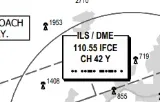
ILS navaid box on a real plate
The ILS box on the Frankfurt 07C plate: 'ILS/DME 110.55 IFCE CH 42 Y' — frequency, identifier, paired DME channel, and the morse ident underneath.
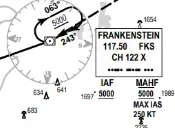
VOR box on a real plate
Same plate, different navaid: the FRANKENSTEIN VOR/DME with its compass rose — '117.50 FKS CH 122 X'. The missed approach holds here.

Frequency types you will see

  • — 108.00–117.95 MHz, e.g. "RID 113.10".
  • ILS — 108.10–111.95 MHz (odd decimals), paired with the .
  • — 190–535 kHz, e.g. "FHD 356".
  • — paired UHF channel, often written as "DME 5.4" distances rather than a frequency.

Tuning in MSFS

In most airliners you rarely tune nav radios manually: the auto-tunes the ILS when the approach is loaded. In aircraft you tune NAV1 to the localizer frequency and the course selector (OBS) to the published course — exactly like the real thing.